How to Win a Shopify Chargeback (2026) — Step-by-Step Response Guide
Step-by-step guide to responding to Shopify chargebacks — from understanding what happened, to collecting evidence, to submitting a response that wins.
You just got the email. The subject line says something about a “chargeback” or “dispute,” and when you open it, you see that money has already been pulled from your account. Your stomach drops. A customer — or someone claiming to be one — went to their bank, disputed a charge, and now Shopify is telling you that you need to respond.
Take a breath. You're not the first seller this has happened to, and you won't be the last. More importantly, you still have time to fight this. You typically have 7 to 21 days to submit your response, and what you do in that window can make the difference between getting your money back and losing it for good.
This guide walks you through every step of responding to a Shopify chargeback — from understanding what just happened, to collecting the right evidence, to submitting a response that actually gives you a chance of winning. No fluff, no theory. Just the steps you need to take right now.
TL;DR — What to Do When You Get a Shopify Chargeback
- Don't panic. You have 7–21 days to respond (check your exact deadline in your Shopify admin).
- Go to Orders in your Shopify admin and find the disputed order.
- Identify the dispute type and reason code.
- Gather targeted evidence based on that specific dispute type.
- Upload your evidence and submit your response before the deadline.
- Wait for the credit card company to review (up to 75 days after submission).
- If you win, you get back the disputed amount and the chargeback fee.
What Is a Shopify Chargeback?
A chargeback happens when one of your customers (or someone who used a card on your store) contacts their bank to dispute a transaction. Instead of coming to you first, they go straight to their bank and say something like “I didn't authorize this” or “I never received this product.”
Here's what makes chargebacks especially painful: the bank takes the money from you immediately. They don't wait for your side of the story. On top of the disputed amount, you also get hit with a chargeback fee (in the United States, that's $15 USD). The money comes out of your next available Shopify Payments payout.
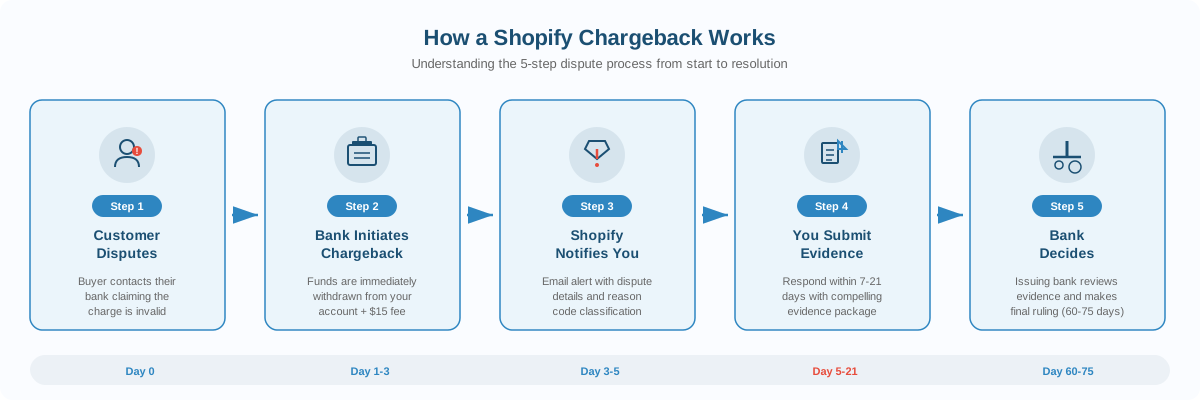
The process works like this:
Step 1: The customer contacts their bank and claims there's a problem with a charge from your store.
Step 2: The bank initiates a chargeback. The disputed amount and a processing fee are withdrawn from your account right away.
Step 3: Shopify notifies you. You'll get an email and see the dispute in your Shopify admin, along with a deadline to respond.
Step 4: You gather and submit evidence. This is your chance to prove the charge was legitimate. You typically have 7 to 21 days, depending on the card network.
Step 5: The credit card company reviews everything. This part can take up to 75 days after you submit your evidence.
Step 6: A decision is made. If you win, you get the disputed amount and the chargeback fee returned. If the customer wins, you lose both. In some cases, you might get a partial win with some of the amount returned.
One critical thing to understand: Shopify doesn't make the decision. The customer's bank and credit card company decide the outcome based on the evidence you submit. Shopify facilitates the process and helps you submit your response, but they have no influence over the result.
Also worth knowing: there is a difference between a chargeback and an inquiry. With an inquiry, the bank is asking questions but hasn't taken your money yet. If you respond well to an inquiry, it may never escalate to a full chargeback. If it does escalate, the disputed amount and fee are then debited from your account.
Shopify Chargeback Types and Reason Codes
Chargebacks on Shopify fall into one of seven categories. Knowing which type you're dealing with is essential because the evidence you need to submit is different for each one.
Fraudulent — The cardholder says they didn't authorize the charge. This is the most common type and often happens when a card was stolen or when a family member made a purchase without the cardholder's knowledge.
Unrecognized — The cardholder doesn't recognize the merchant name on their statement. This frequently happens when your billing descriptor doesn't clearly match your store name. You respond to this the same way as a fraudulent dispute.
Duplicate — The customer believes they were charged twice for the same product or service. Sometimes this is a genuine processing error; other times the customer mistakes a pending authorization hold for a second charge.
Subscription Canceled — The customer claims they were charged for a subscription after canceling it, or they expected a reminder before each recurring charge and didn't receive one.
Product Not Received — The customer says they never got what they paid for. This applies to physical goods, digital products, and services.
Product Unacceptable — The customer received the product but says it was defective, damaged, or significantly different from what was advertised on your store.
Credit Not Processed — The customer says they returned a product or canceled a transaction, but you haven't issued the expected refund.
General — A catch-all for disputes that don't fit the categories above. This might involve unexpected amounts, currency conversion issues, or processing errors.
For a complete breakdown of reason codes across all card networks, check out our Chargeback Reason Codes Guide.
How to Respond to a Shopify Chargeback (Step by Step)
If you're wondering what to do after getting your first chargeback on Shopify, this is the section that matters most. Follow these steps carefully.
Step 1: Check the Chargeback Details and Deadline
Go to your Shopify admin. Navigate to Orders, then click the Search and filter button. Select Add filter, then choose Chargeback and inquiry status and set it to Open. This shows you all orders with active disputes.
Click on the disputed order. You'll see a chargeback banner with the key details: the dispute type, the amount, and — most importantly — your deadline to respond. This deadline is typically 7 to 21 days after the chargeback is filed and displays in your store's timezone. If no specific time is shown, the cutoff is 11:59 PM on the date displayed.
Do not miss this deadline. After the submission deadline passes, you cannot submit any further evidence. There are no exceptions.
Step 2: Identify the Dispute Type and Reason Code
On the same order page, review the chargeback reason. Shopify categorizes disputes into the seven types listed above. Understanding the exact reason code helps you know what evidence will be most persuasive.
When available, the bank may also provide an issuer claim — a document explaining why the buyer opened the dispute. You can find this in the chargeback details section of the order page. If it's there, read it carefully. It tells you exactly what the customer told their bank, which helps you craft a targeted response.
Step 3: Collect Targeted Evidence
This is where most sellers either win or lose. The evidence you need depends entirely on the type of dispute you're facing (we cover the specifics in the next section).
A few general principles:
- Only PDF, JPEG, or PNG files are accepted. PDFs must be PDF/A compliant, with fewer than 50 pages per file.
- Each evidence file cannot exceed 2 MB, and your total combined evidence cannot exceed 4 MB.
- Submit only one file per evidence type. If you have multiple files for one category, combine them into a single PDF or image.
- Make images high-contrast and legible. Many banks still receive chargeback evidence via fax, so ensure everything prints clearly in black and white. Use callouts or arrows to highlight key information.
- Do not include audio, video, external links, or requests to call/email for more information.
Label every piece of evidence clearly. Instead of “screenshot,” write something like “Delivery confirmation showing package delivered to customer's address on March 3, 2026.”
Step 4: Submit Your Evidence in Shopify Admin
From your Shopify admin, go to Orders and click the disputed order. In the chargeback banner, click Add evidence. On the Chargeback response page, review the information about the dispute, enter any additional details, and upload your evidence files.
Click Save to save your progress. Your work is automatically saved as you go, and you can return to edit your evidence at any time before the due date.
When you're ready, you have two options:
- Submit now by clicking “Submit now” and confirming. After this, you cannot make any further edits.
- Let Shopify submit automatically on the due date. If you use Shopify Payments, Shopify automatically populates available transaction data and sends the response to the credit card company on the due date.
Important: even if you choose to wait, make sure all your evidence is uploaded well before the deadline.
Before you submit, make sure your evidence is organized with a professional cover letter. A structured response letter with labeled exhibits dramatically improves your chances — see our Chargeback Response Letter Template for a ready-to-use format.
Step 5: Wait for the Decision
After submission, the credit card company reviews the evidence. This typically takes up to 75 days. During this time, the status in your Shopify admin will show as “submitted.”
Once a decision is made:
- Won: The disputed amount and chargeback fee are returned to you.
- Partial win: Some of the disputed amount is returned.
- Lost: You keep nothing. If an issuer response is available, review it to understand why the bank ruled against you — this can help you improve future responses.
After the bank makes a decision, it's final. There is no appeal process. Shopify cannot overturn the decision.
Not sure what evidence to gather for your specific dispute type? Check out our Chargeback Evidence Guide.
What Evidence to Submit for Each Chargeback Type
The number one mistake sellers make when fighting a Shopify chargeback is submitting generic evidence. What works for a “product not received” dispute is completely different from what works for a “fraudulent” dispute. Here's a breakdown of the most critical evidence for each type.
Fraudulent / Unrecognized
Your goal is to prove the real cardholder authorized the transaction.
- AVS and CVV verification showing the billing address and security code matched the card on file
- Device and IP data demonstrating the transaction came from a location or device consistent with the customer's history
- 3D Secure authentication records if the customer completed additional verification
- Order history showing previous successful orders from the same email, address, or customer account
- Delivery confirmation proving the order shipped to and was received at the customer's verified address
- Customer communications — any messages from the customer acknowledging the order
Duplicate
Your goal is to prove each charge corresponds to a separate purchase.
- Transaction logs showing only one charge was processed, or that multiple charges were for separate orders
- Order details comparison highlighting different order numbers, timestamps, and items
- Pre-authorization explanation if one charge was a temporary hold that cleared
- Receipts for each transaction demonstrating separate purchases
- Refund confirmation if a genuine duplicate did occur and you already refunded it
Subscription Canceled
Your goal is to prove the subscription was still active when charged.
- Subscription agreement with terms the customer accepted, including billing cycle and auto-renewal
- Cancellation policy showing how and when customers must cancel
- Cancellation records proving no valid cancellation request exists in your system
- Usage logs showing the customer continued using the service after the disputed charge date
- Billing notifications or renewal reminders sent before the charge
Product Not Received
The evidence varies depending on what you sell:
Physical products:
- Carrier name, tracking number, and delivery status
- Delivery confirmation with signature or photo if available
- Shipping address verification showing the item went to the checkout address
Digital products:
- Access logs showing the customer downloaded or used the product
- Delivery confirmation (email with download link, license key, or access credentials)
- Usage timestamps
Services:
- Appointment or booking records
- Service completion proof (work logs, signed forms)
- Customer acknowledgment confirming the service was performed
For high-value orders, requiring signature confirmation at delivery significantly strengthens your position.
Product Unacceptable
Your goal is to prove the product matched what was advertised.
- Product listing at time of purchase — screenshots showing exactly what was described
- Order and fulfillment records detailing what was ordered, shipped, and when
- Pre-shipment photos including packaging and serial numbers
- Quality control records if applicable
- Customer communications showing the issue was reported and you offered resolution
- Return policy the customer agreed to at checkout
- Evidence the customer never contacted you before filing the dispute — card networks expect buyers to attempt resolution with the merchant first
Credit Not Processed
Your goal is to prove the refund was issued or wasn't owed.
- Refund transaction record with timestamps, amount, and confirmation number
- Bank or processor statement showing when the refund was processed
- Your refund policy highlighting the conditions the customer agreed to
- Customer communications where you explained the refund status
- Return tracking showing whether you received the returned item
General
- Itemized receipt with clear breakdown of price, taxes, fees, and any other charges
- Checkout confirmation showing the final amount before payment
- Pricing policy explaining taxes, fees, or currency conversion
- Exchange rate documentation for international transactions
- Customer communications confirming the price or explaining additional charges
For guidance on organizing all of this into a professional, bank-ready format, see our Dispute Response Letter Guide.
For Stripe merchants or PayPal sellers, the evidence requirements are similar but the submission process differs — check our platform-specific guides.
Shopify Chargeback Fees, Deadlines, and Rate Limits
The Chargeback Fee
Every time a chargeback is filed, Shopify Payments charges a processing fee. If you win the dispute, the fee is returned to you along with the disputed amount.
Here are the fees by country/region:
| Country/Region | Fee |
|---|---|
| United States | $15 USD |
| Canada | $15 CAD or $15 USD |
| United Kingdom | £10 GBP |
| Australia | $25 AUD |
| New Zealand | $20 NZD |
| Japan | ¥1,300 JPY |
| Hong Kong SAR | $85 HKD |
| Singapore | $16.35 SGD |
| Mexico | $200 MXN |
| Ireland | €15 EUR + 23% VAT |
| Most EU countries | €15 EUR |
| Gibraltar | £15 GBP |
| Switzerland / Liechtenstein | €15 EUR or 15 CHF |
If you're using Shopify Payments and don't have enough funds in your account to cover the chargeback, the handling depends on your location. In the US, UK, Canada, Australia, and several other countries, the balance is debited directly from your bank account outside your regular payout schedule. In other countries, the amount is deducted from future payouts until fully covered.
Response Deadlines
Your window to respond is typically 7 to 21 days after the chargeback is filed. The exact deadline depends on the card network and is displayed on the chargeback detail page in your Shopify admin.
You can edit and update your evidence at any time before the deadline. However, once you click “Submit now” to send your response early, you cannot make further changes.
If your store is closed or paused when a chargeback comes in, you'll still receive the email notification. You'll need to reopen your store (and pay for a plan) before you can submit additional evidence. If you don't reopen, only basic transaction data is submitted on your behalf.
Chargeback Rate: Why It Matters
Your chargeback rate is the number of chargebacks you receive in a given month divided by your total chargeback-eligible transactions during that same period. You can track this metric in the Analytics section of your Shopify admin under “Chargeback rate reporting.”
Two important things to understand:
Winning a dispute does not remove it from your chargeback rate. The rate is based on the number of disputes filed, not the outcomes. Even if you win every single case, those disputes still count.
A high chargeback rate has serious consequences. Card networks like Visa and Mastercard run monitoring programs that track dispute rates. Visa's current program — the Visa Acquirer Monitoring Program (VAMP), which went into full enforcement in October 2025 — uses a combined ratio of fraud reports and disputes divided by settled transactions. As of June 2025, the “Excessive” merchant threshold is a VAMP ratio of 2.2%, and this is scheduled to drop to 1.5% in the US, Canada, and EU in April 2026.
If your rate exceeds these thresholds and you meet the minimum monthly dispute count, you could face additional per-transaction fees, mandatory enrollment in monitoring programs, or even restrictions on your ability to process payments. For Shopify sellers specifically, a high number of chargebacks can result in Shopify Payments being deactivated and potential removal from the platform's payment processing.
The bottom line: preventing chargebacks is just as important as fighting them.
Shopify Protect: What It Covers (and What It Doesn't)
Shopify offers a free fraud protection program called Shopify Protect that covers certain eligible orders against fraudulent and unrecognized chargebacks. If a qualifying dispute occurs on a protected order, Shopify reimburses you for the full order amount (including shipping) and the chargeback fee. They even handle the dispute process for you — no evidence submission required on your end.
Sounds great, right? Here's the catch: the eligibility requirements are narrow.
What's required for coverage:
- The order must be placed through Shop Pay (Shopify's accelerated checkout)
- The order must be fulfilled with a tracking number within seven days of the order being placed
- You must use an approved carrier
- Currently available for US stores only
What's NOT covered:
- Any dispute that isn't classified as “fraudulent” or “unrecognized” — meaning product not received, product unacceptable, duplicate, subscription canceled, credit not processed, and general disputes are all excluded
- Orders paid through Shop Pay Installments are typically not eligible
- Orders that weren't fulfilled within the required timeframe or that used unsupported carriers
Why you can't rely on Shopify Protect alone: The program only covers fraud-related disputes on Shop Pay orders that meet all eligibility criteria. The majority of chargebacks — including “item not received” and “not as described” claims — fall completely outside its scope. And even protected chargebacks still count toward your overall chargeback rate, so Shopify Protect doesn't help with threshold monitoring programs.
Think of Shopify Protect as a safety net for a specific type of dispute, not a comprehensive chargeback strategy.
Why Most Shopify Sellers Lose Chargebacks They Should Win
Here's an uncomfortable truth: many sellers lose disputes not because they're in the wrong, but because they respond poorly. The evidence was there — they just didn't present it in a way that convinced the bank.
These are the most common mistakes:
Submitting a single tracking screenshot and nothing else. A tracking number alone doesn't tell the full story. Banks need to see the connection between the customer, the order, the payment authorization, and the delivery. One screenshot isn't an evidence package.
Ignoring the dispute type. A “fraudulent” chargeback requires proof of authorization (AVS match, IP data, customer account history). A “product not received” chargeback requires delivery confirmation. Sending the same generic response for every type is a fast way to lose.
Writing a three-sentence response. “The customer ordered this product. We shipped it. Here's the tracking number.” That's not enough. Banks review hundreds of disputes. Your response needs to be clear, organized, and thoroughly documented.
Not contacting the customer first. Sometimes the whole thing is a misunderstanding. The customer didn't recognize your billing descriptor, or a family member made the purchase. A simple email or phone call can lead to the customer voluntarily withdrawing the dispute.
Missing the deadline. It sounds obvious, but it happens. If you don't submit evidence before the due date, the chargeback is automatically resolved against you. There are no extensions or exceptions.
The difference between winning and losing often isn't about having better evidence — it's about presenting the same evidence more effectively. A well-organized response that labels every piece of evidence, connects it to the specific reason code, and tells a coherent story is dramatically more persuasive than a collection of random screenshots.
How to Win a Shopify Chargeback
Winning a Shopify chargeback comes down to four things: responding quickly, matching your evidence to the specific dispute type, presenting it professionally, and learning from the outcome. Here's a summary of the winning approach:
- Act immediately. The moment you see a chargeback notification, check your deadline. You typically have 7–21 days, and every day you delay is a day less to gather evidence.
- Match evidence to reason code. A fraud dispute needs AVS/CVV data and customer identity proof. A “not received” dispute needs delivery confirmation. Don't send generic evidence — tailor it to the specific claim. Check our Reason Code Reference if you're unsure what your code requires.
- Use a structured response letter. Don't just upload screenshots. Write a professional cover letter with labeled exhibits that walks the bank reviewer through your case. Use our Response Letter Template as a starting point.
- Include ALL relevant evidence. More exhibits (properly labeled) is better than fewer. AVS match, CVV match, delivery confirmation, customer communications, order confirmation emails, product descriptions — include everything that supports your case. See our Evidence Guide for complete checklists.
- Make it easy for the reviewer. Label every file. Number every exhibit. Reference each one in your cover letter. The easier you make the reviewer's job, the more likely they are to rule in your favor.
Or skip the manual work entirely: upload your evidence to ChargebackWin and get a professional, bank-ready response letter generated in 60 seconds.
How to Prevent Chargebacks on Shopify
Fighting chargebacks is expensive and time-consuming — even when you win. The best chargeback strategy is prevention. Here are the most effective ways to reduce disputes on your Shopify store.
Optimize Your Billing Descriptor
Many “unrecognized” and “fraudulent” chargebacks happen because the customer doesn't recognize the charge on their bank statement. Go to Settings → Payments → Shopify Payments → Manage in your Shopify admin and make sure your billing descriptor clearly matches your store name or website URL. If your legal business name is different from your storefront, use the customer-facing name.
Enable 3D Secure Authentication
3D Secure (also known as Verified by Visa, Mastercard Identity Check, or Amex SafeKey) adds an extra verification step during checkout. When a transaction passes 3D Secure, liability for fraud chargebacks shifts from you to the card issuer. Shopify Payments supports 3D Secure — make sure it's enabled in your payment settings.
Ship with Tracking and Signature Confirmation
Always ship with tracking numbers, and require signature confirmation for orders above $250. Add tracking numbers to your Shopify orders immediately after shipping so they're on file if a dispute arises. For high-value items, signature confirmation is your strongest defense against “not received” claims.
Communicate Proactively with Customers
Send order confirmation emails immediately after purchase. Send shipping notifications with tracking links as soon as the order ships. Follow up with a delivery confirmation or “how's your order?” email a few days after delivery. Many disputes happen because customers feel ignored — proactive communication prevents that.
Make Your Return Policy Clear and Accessible
Display your return and refund policy prominently — on product pages, in the checkout flow, in order confirmation emails, and in your website footer. Customers who know how to request a refund directly are less likely to go to their bank first. A hidden or confusing return policy practically invites chargebacks.
Use Shopify Flow for Fraud Prevention
Shopify Flow lets you create automated workflows that flag or cancel high-risk orders. Set up flows to automatically hold orders with mismatched billing/shipping addresses, high-risk fraud analysis scores, or unusually large quantities. Review these orders manually before fulfilling them.
Respond to Customer Inquiries Quickly
Most customers file chargebacks as a last resort — when they can't get a response from the merchant. Aim to respond to all customer emails and messages within 24 hours. A quick refund or replacement offer is almost always cheaper than fighting a chargeback.
Prevention alone won't eliminate chargebacks entirely — some customers will always dispute charges regardless of your policies. But these practices can significantly reduce your chargeback rate and strengthen your position when disputes do occur.
Shopify Chargeback Response Template
Here's a response template specifically designed for the most common Shopify chargeback: a “Product Not Received” dispute where you have delivery confirmation. Adapt it to your case.
[Your Store Name]
[Store URL]
[Contact Email]
[Date]
Re: Chargeback Dispute — Case [#Case ID]
Transaction: $[Amount] — [Order Date]
Order: [Shopify Order #]
Reason Code: 13.1 — Merchandise Not Received
Dear Dispute Resolution Team,
We are submitting this representment in response to the above chargeback. We respectfully request reversal based on the following evidence confirming that the merchandise was delivered to the customer's verified address.
About Our Business
[Store Name] is a Shopify-powered ecommerce store specializing in [brief description]. We have been operating since [year] and have fulfilled [X]+ orders.
Transaction Details
— Order Date: [Date]
— Order Number: [Shopify Order #]
— Item(s): [Product name(s)]
— Total: $[Amount]
— Payment: [Card type] ending in [####]
— AVS: Full Match | CVV: Match
Evidence Summary
— Exhibit A: Shopify Order Confirmation — Shows order details, customer info, and payment verification.
— Exhibit B: Shipping Confirmation — [Carrier] tracking [#], shipped [Date].
— Exhibit C: Delivery Confirmation — [Carrier] confirms delivery on [Date] to [Address]. [Signature: Name if available.]
— Exhibit D: Address Match — Shipping address matches the AVS-verified billing address.
— Exhibit E: Customer Communication — [No prior contact / Customer notified of shipment on Date].
Conclusion
The evidence confirms that Order [#] was delivered to the cardholder's verified address. We respectfully request reversal of this chargeback.
Sincerely,
[Your Name]
[Store Name]
Want this generated automatically from your Shopify order data? Try ChargebackWin for Shopify — upload your evidence and get a professional response letter in 60 seconds.
For more templates covering fraud disputes, subscription cancellations, and other types, see our complete Chargeback Response Letter Guide.
Frequently Asked Questions
How long do I have to respond to a Shopify chargeback?
The response window is typically 7 to 21 days after the chargeback is filed. Your exact deadline is displayed on the chargeback detail page within your Shopify admin. After the deadline passes, you cannot submit any additional evidence — no exceptions.
Does winning a chargeback remove it from my dispute rate?
No. Your chargeback rate is calculated based on the number of disputes filed, not the outcomes. Even if you win a dispute, it still counts toward your rate.
Can I appeal a lost Shopify chargeback?
No. Once the bank or credit card company makes a decision on a chargeback, that decision is final. There is no appeal process, and Shopify cannot overturn it.
How much does a Shopify chargeback cost?
In the United States, the chargeback fee is $15 USD. This fee is charged on top of losing the disputed transaction amount. If you win the dispute, both the transaction amount and the fee are returned to you.
Should I fight every chargeback?
Not necessarily. If you genuinely owe the customer a refund, it may be better to accept the chargeback. However, if you have evidence that the charge was valid and you fulfilled your obligations, you should absolutely submit a response. Every uncontested chargeback is a guaranteed loss.
What happens if my Shopify chargeback rate is too high?
A consistently high dispute rate can trigger serious consequences. Card networks may place you in a monitoring program with additional fees. Your payment processor (including Shopify Payments) may restrict or deactivate your account. Keep your rate low by using clear product descriptions, proactive customer communication, visible policies, and prompt responses to customer complaints.
Ready to Fight Your Chargeback?
Upload your evidence and get a professional response letter in under 60 seconds. Our AI analyzes your case and generates a dispute-specific rebuttal.
Fight My Chargeback